Introduction
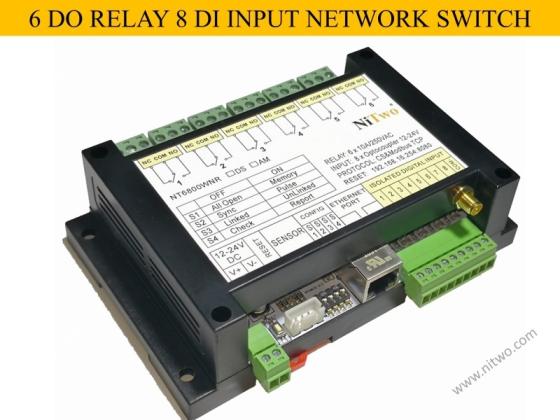
NT6800WNR has 6 relays, 8 isolated input. Communicate by rj45 network or Wi-Fi, supports Modbus-TCP.
( NT6800WNDSR: with one DS18B20 temperature sensor in addition )
It can be controlled by PLC / computer / android, suitable for industrial automation, data acquisition systems, environmental monitoring and local control of an electrical and non-electrical parameter, building automation etc.
Key components: HLK-RM04 serial network module, STM8S105K4T6C, HR911105A, supports secondary development.
How to use network relay made by nitwo tech? It’s easily by 3 steps:
Step 1: Power on the NT6800WNR module with 12-24VDC.
Step 2: Search the SSID of hi link network module rm04 with Wi-Fi dhcp mode.
Step 3: Run android app or .exe file of computer and connect with IP:192.168.16.254 port: 8080
NT6800WNR app apk and .exe software download link:
https://www.nitwo.com/en/download/download-nt6800wnr-apk-exe.html
Features
> 10/100 Mb Ethernet connectivity;> Auto-MDIX;> 8 digital isolated inputs,8 input + with one COM-;
> 6 relay outputs Type: with NO and NC contacts;
Contact current rating: 10 A @ 30 VDC/250 VAC (resistive load)
Initial insulation resistance: 100 mega-ohms (min.) @ 500 VDC
Minimum pulse output of relay: 2 Hz at rated load
> SMA Wi-Fi male pin socket adapter for antenna or adaptor for extension cable.
> 35mm DIN Rail fixed
> Working voltage: 12 to 24V wide voltage input
> Working current: 0.3~0.5 A ( all relays ON)
> Plug-able high current terminals, convenient for wiring and changing position
Operating mode configuration switch description (able to custom as client's need)
S1 OFF: All relay state is off when power on (all open mode).
S1 ON: All relay states before power off can be logged in internal flash memory, for next time power on they will active same as the last time (memory mode).
S2 OFF: Relay is able to active sync with digital DI input, example input 1 availed the relay 1 availed also, only be controlled locally by DI (sync mode).
S2 ON: Relays can be activated either remotely PLC/Computer (MODBUS Master) or locally by digital DI input (pulse mode).
S3 OFF: Relay will active with digital DI input changing (Sync or Pulse mode, optional by dial dip-switch S2) (Linked mode).
S3 ON: Relay is able to configure to no relation with digital DI input, example input 1 availed but the relay 1 doesn’t availed (unlinked mode).
S4 OFF: Accessed by upper Master PLC/Computer (check mode).
S4 ON: Initiative to report the DO DI states to upper Master PLC/Computer (report mode).
SENSOR: Connect to temperature sensor or temperature humidity sensor (coming soon).
Power-LED: Power is ON
Wi-Fi-LED: Blinks when Wi-Fi working mode
Lan-Link-LED: Blinks when LAN working mode










Clients Reviews